"What version is in staging?" is a question that should have a one-second answer. In practice, it usually involves checking a CI/CD dashboard, correlating with a Git tag, and hoping the label matches the binary.
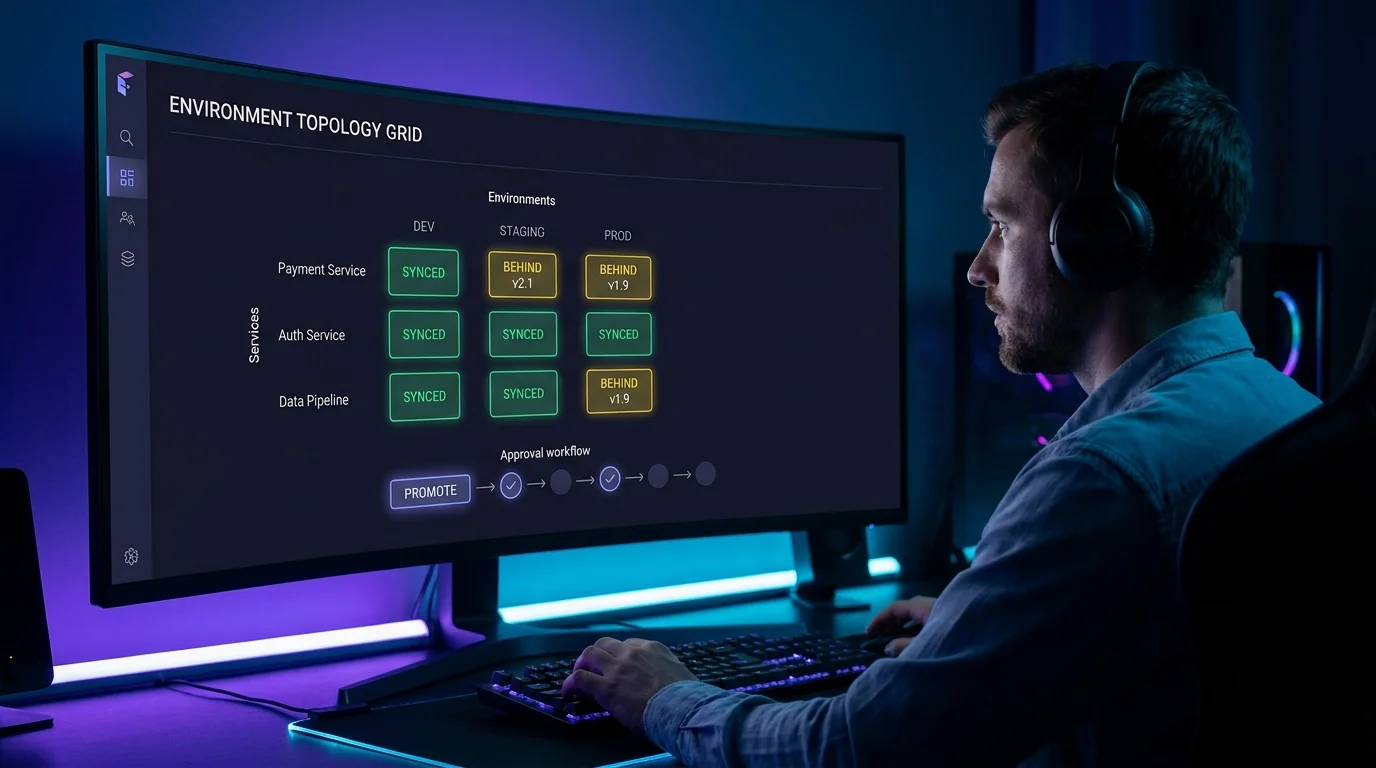
VibeControls' Environment Topology view makes version state a first-class platform concern. Every service is tracked across its environment lifecycle — dev, staging, and production. The current version in each environment is recorded whenever a deployment is registered with the platform.
The topology view is a grid: services on one axis, environments on the other. Yellow means staging is behind production. Red means prod hasn't received a release that's been in staging for a week. Green across the board means everything is in sync.
When you're ready to promote, the platform records the promotion event in the audit log: who triggered it, which version moved, from which environment to which. The approval gate (for platform teams that require sign-off before production) is built in.
This turns "what's deployed where" from a question answered by tribal knowledge into a dashboard answered in one glance.
Do it yourself
See the live version of every service across development, staging, and production in one matrix, spot version drift at a glance, and safely promote a version forward with a built-in audit trail.
From the VibeControls sidebar, click the Environment Topology nav item to open the environments page.
You should see: A grid loads with your services listed down the side and Development, Staging, and Production across the top.
Ready to make this your story?